
End the "Is It Done Yet?" Calls.
StatusTrackr turns your job pipeline into a visual, pizza-style tracker that customers instantly understand—reducing calls, emails, and interruptions.
No app downloads. No logins. Works on any device.
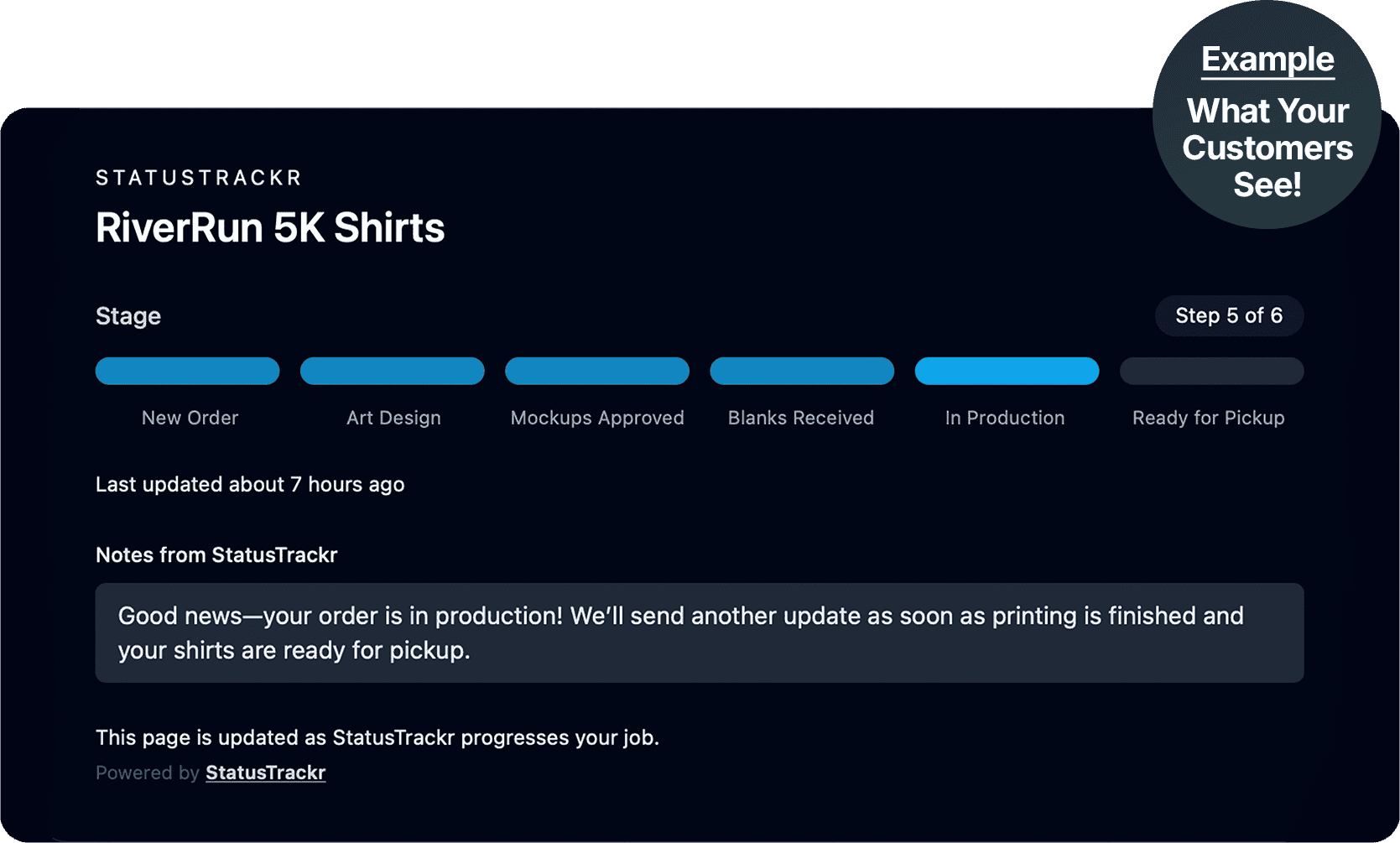
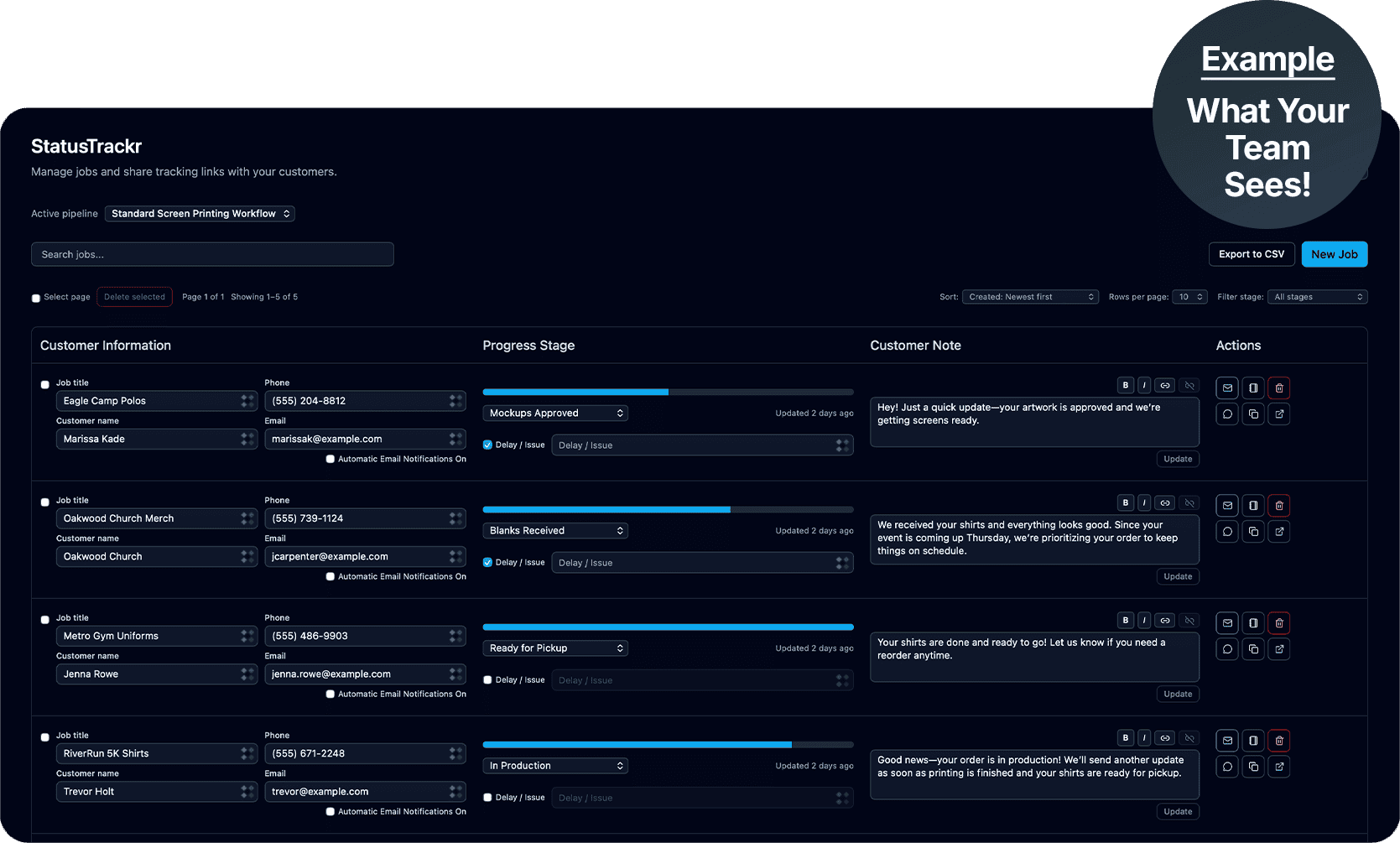
- Happier, Informed Customers
- Fewer Customer Emails
- Reduced Call Load
Are Customer Updates Slowing You Down?
Customers don’t know what’s happening—so they keep chasing you for answers.
I’m Drowning in Updates
Business owners say they spend far too much time sending manual updates just so clients don’t feel ignored. Emails, texts, and scattered messages all steal time from actually doing the work.
Things Keep Getting Lost
Project updates get buried in email, forgotten in chats, or trapped in someone’s head. Without a central source of truth, details slip and expectations drift.
Customers Keep Asking "Any Update?"
Owners across industries say customers reach out constantly. The same question comes in all day: “What’s the status?” And answering it over and over kills productivity.
Status Updates, Solved
I get it — keeping customers updated shouldn’t feel like a full-time job.
I own a small screen-printing business. Every day I am juggling production, artwork approvals, inventory, and timelines — while constantly stopping to reply to emails, texts, and phone calls asking for order updates. Customers aren’t impatient, they are just in the dark. And every interruption slows down real work.
That’s why I built StatusTrackr. It’s designed by someone who understands service workflows, production stages, and customer expectations. StatusTrackr gives your customers clear, real-time progress updates, so you spend less time explaining and more time delivering.
– Joshua McManaway, StatusTrackr Creator

Turn Fewer Questions into Happier Customers
StatusTrackr isn’t just another internal tool — it’s designed to reduce customer concern, save your team time, and make your business look more professional at every stage of the job.
Fewer “Is it done yet?” Messages
Customer-facing status pages with real-time progress stages give customers a simple link where they can instantly see where their job stands — no logins, no phone calls, no emails.
Less Time Spent on Manual Updates
Make easy stage updates that notify customers when your team moves a job forward, this keeps everyone informed without extra work.
A Professional Customer Experience
Replace confusion and scattered messages with a clear workflow that builds trust and customer satisfaction.
What Customers Are Saying
“It instantly cut down customer check-in calls.”

We’re a small shop, so interruptions really add up. Once we started sending customers their StatusTrackr link, the phone stopped ringing as much — in a good way.

Mike Reynolds

StatusTrackr was incredibly easy to set up. Once we started using it, we realized how much time we were wasting on manual updates before.
Sarah Mitchell

Before StatusTrackr, updates were scattered across emails and texts. Now everything is in one place, and customers actually trust the process more.
David Carter
How StatusTrackr Works
Set up your workflow pipeline once, move jobs through each stage, and keep customers in the loop—without extra emails or phone calls.
STEP #1
Create Your Workflow
Set up your pipeline.
(e.g., Received → In Progress → Ready → Completed)
STEP #2
Add a Job
Job name, customer name, email, optional phone, and assign a stage.
STEP #3
Share the Tracking Link
Customers see a beautiful real-time tracker and stop calling.
Built to Keep Customers Informed at Every Stage
From real-time progress tracking to proactive delay alerts, StatusTrackr gives you everything you need to reduce “What’s the status?” calls and emails.
Build Pipelines That Match Your Business
Add each step of the process, create the exact workflow you use every day.
A Beautiful, Easy to Understand Tracker
Each job generates a unique shareable link showing current stage, customer notes, and your branding.
Manage All Jobs in One Place
Clean, simple dashboard for your team. Easily update stages and send notifications.
Automatic Email & SMS Updates
Notify customers instantly when their job moves forward.
Built for Teams
Assign jobs, track responsibilities, and keep everyone aligned.
Proactive Delay & Issue Alerts
Let customers know before they ask. Instantly flag delays or other issues.
See Both Sides of StatusTrackr
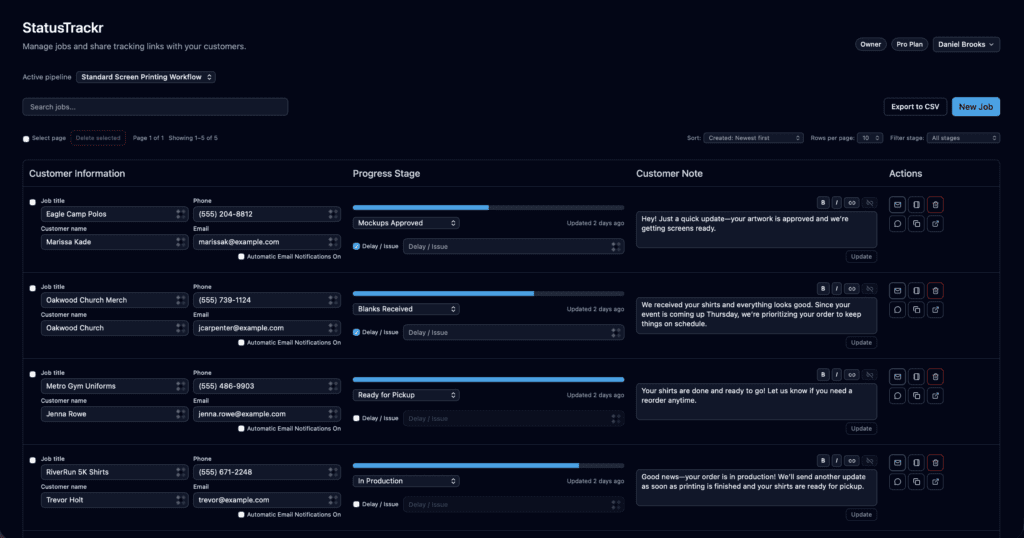
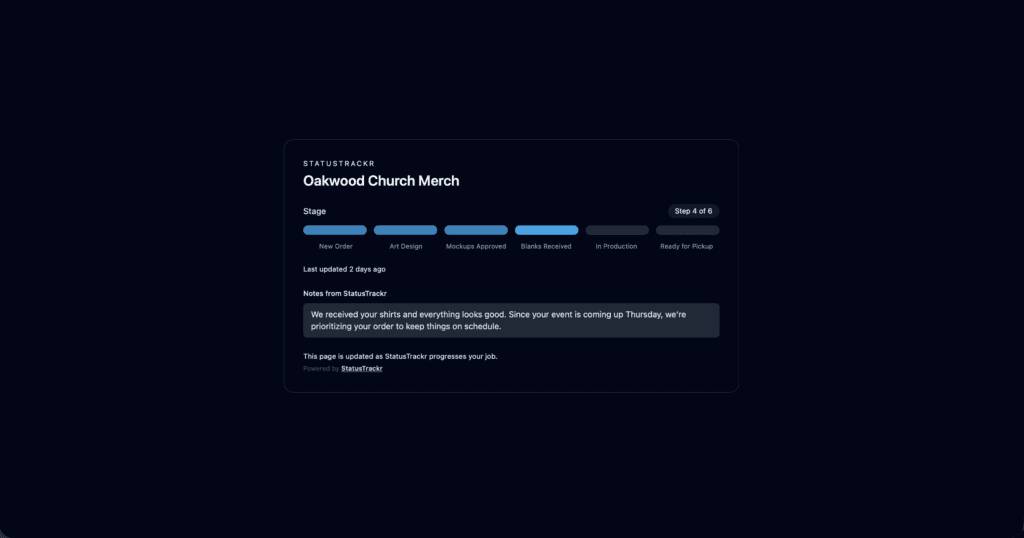
StatusTrackr gives you a simple internal dashboard to manage work and a clean, customer-facing tracking page that keeps clients informed.
Internal Dashboard
Manage jobs, update stages, and send updates. Keep your workflow organized in one simple view.
- View all jobs in one place
- Update stages in seconds
- Spot delays before customers ask
Customer Tracking Page
Customers receive a clean, shareable link showing exactly where things stand—no login required.
- Real-time progress updates
- Branded and professional
- Fewer “Is it done yet?” messages
Built for teams that need to keep people in the loop
StatusTrackr is for any organization managing multi-step processes where people constantly ask “What’s the status?” — and you want to answer that before they have to ask.
Service Businesses
Home services, auto repair, contractors, repair shops
Project-Based Businesses
Print shops, agencies, creative studios, consultants
Custom Orders & Production
Custom products, made-to-order businesses
Title & Insurance Companies
Customers wait for weeks and people chase updates.
Education, HR Teams, & Healthcare
Show applicants where they are in the process — documents received, approvals pending, next steps.
Customer-Facing Teams
Anyone tired of answering the same question, “When will this be done?”
Simple Pricing. No Contracts.
Everything you need to keep customers informed. Choose a plan that fits your business today and upgrade anytime as you grow.
Starter
For Small Shops-
1 customizable progress pipeline
-
100 open jobs at a time
-
Single user
-
Core dashboard
-
Customer-facing tracking page
-
Customer notes
-
Delay/Issue notification
-
Basic customer email notifications
Pro
Automation & Scaling-
3 customizable progress pipelines
-
Unlimited jobs
-
Up to 10 users
-
Role-based access control
-
Core dashboard
-
Customer-facing tracking page
-
Customer notes & internal notes
-
Delay/Issue notification
-
Automated customer email notifications
-
Option to remove StatusTrackr branding
-
Add business logo + colors to tracking page
-
Import Jobs by CSV
-
Export jobs to CSV
-
Basic analytics
Team
For Large Teams-
5 customizable progress pipelines
-
Unlimited jobs
-
Up to 100 users
-
Role-based access control
-
Core dashboard
-
Customer-facing tracking page
-
Customer notes & internal notes with @mentions
-
Full history log of all notes
-
Delay/Issue notification
-
Automated customer email notifications
-
Option to remove StatusTrackr branding
-
Add business logo + colors to tracking page
-
Import Jobs by CSV or API
-
Export jobs to CSV
-
Advanced analytics
-
API Access
SMS Notifications (Optional Add-On)
Add automated text message updates to any plan for $5/month, plus $0.03 per outbound SMS. Perfect for time-sensitive updates and customers who prefer texts over email.
Frequently Asked Questions
Everything you need to know before getting started — clear answers, no surprises.
No. Customers receive a simple link they can open on any device to see real-time progress updates. No usernames, passwords, or apps to install..
Most businesses can create their first pipeline and start sharing tracking links in under 10 minutes.
Yes. You can fully customize your stages to match your real-world process — rename steps, reorder them, and update statuses as work progresses.
Yes. Both the internal dashboard and the customer status pages work great on phones and tablets.
We offer a 30-day money-back guarantee for new customers.
StatusTrackr is designed for any organization that needs to keep people informed as something moves through steps. It works great for service businesses (auto repair, printing, contractors), but also for internal processes like student enrollment, onboarding, approvals, or project milestones.
Customers can view their status anytime via their share link, and you can send manual or automatic email/SMS updates when a job moves forward or hits a delay.
You can mark delays, add notes, and notify customers instantly. This helps set expectations proactively and dramatically reduces “what’s going on?” calls and emails.
SMS notifications can be added to any plan for $5/month + $0.03 per outbound message. You’re always in control of when texts are sent.
Yes. All plans are month-to-month with no contracts. You can upgrade, downgrade, or cancel anytime.
Yes. StatusTrackr is built with modern security best practices, and your data always belongs to you. Never shared, nor sold.
Stop Answering “Is It Done Yet?”
No contracts. Set up in minutes. Cancel anytime.